The best battery-powered smart locks make keyless entry more convenient without requiring new wiring. This roundup compares 10 options with fingerprints, palm recognition, keypads, apps, and traditional backup keys.
Before choosing, consider whether you need remote access, multiple user codes, biometric entry, or a simple battery-powered replacement for an existing deadbolt or door knob.
Best 10 Battery Powered Smart Locks Picks for 2026
Contactless Biometric Pick
- Contactless palm vein recognition
- Dual batteries with USB-C emergency charging
- Wi-Fi, keypad, voice, and key access
Best For: Households wanting contactless biometric entry with remote control
Fingerprint Access Pick
Tapo Smart Wi-Fi Door Lock DL110

- Six access methods, including fingerprint and Wi-Fi
- Stores up to 100 fingerprints
- Rechargeable battery rated for up to one year
Best For: Families and hosts managing multiple access methods
Simple Keypad Value

- Up to 20 user codes plus one-time guest access
- Up to 365 days on four AA batteries
- IP54 protection with mechanical key backup
Best For: Buyers wanting a straightforward non-connected keypad lock
Smart-Home Biometric Pick

- Palm vein entry with five unlock methods
- Built-in Wi-Fi and broad smart-home compatibility
- Rechargeable battery with USB-C emergency charging
Best For: Smart-home users wanting contactless access across platforms
Best Wi-Fi Value

- Multiple keypad, app, Bluetooth, voice, and key entry methods
- Up to 200 days of Wi-Fi battery life with four AA batteries
- Supports custom codes, activity logs, auto-lock, and emergency USB-C power
Best For: Homes wanting flexible access and broad smart-home compatibility
Best Fingerprint Battery Life

- Self-learning fingerprint access unlocks in less than 1.5 seconds
- Eight AA batteries provide around eight months of operation
- Built-in Wi-Fi enables remote control without a bridge
Best For: Front doors prioritizing biometric entry and long battery life
Best Fast Fingerprint Entry

- Fingerprint scanner is designed for approximately 0.5-second unlocking
- Up to eight months of battery life from eight AA batteries
- Built-in Wi-Fi, app management, USB-C emergency power, and backup keys
Best For: Users prioritizing rapid biometric entry and flexible backup access
Best Connected Pick

- 10,000mAh rechargeable battery
- Fingerprint, keypad, app, key, and voice access
- Supports Matter, Apple Home, Alexa, and SmartThings
Best For: Connected front doors needing rechargeable power and biometric entry
Best Retrofit Value
Yamiry Fingerprint Keypad Door Knob

- Five entry methods including fingerprint and key fob
- Stores up to 50 passwords, fingerprints, and key fobs
- Optional Wi-Fi gateway for remote control
Best For: Standard doors needing easy local access and simple installation
Best Indoor Privacy Lock
- Fingerprint, keypad, app, IC card, and key access
- One-time and timed passcodes with access logs
- Privacy lock and anti-peep keypad
Best For: Bedrooms, offices, rentals, and other indoor doors
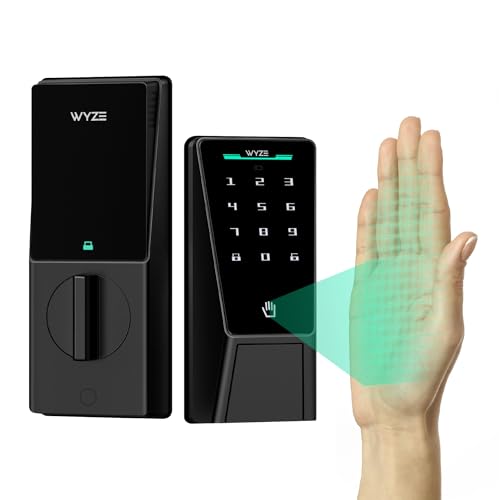
Contactless Biometric Pick – Wyze Palm Lock
For shoppers comparing battery powered smart locks, the Wyze Palm Lock stands out with contactless palm vein recognition, Wi-Fi control, and multiple backup options. Its dual-battery design, emergency USB-C charging, keypad, and mechanical key help keep access practical if the primary power source runs low.
Best For: Households wanting contactless biometric entry with remote Wi-Fi control.
Pros:
- Palm vein recognition provides touch-free entry and supports up to 50 guest codes.
- Dual batteries and USB-C emergency charging provide added backup access.
- Includes auto-lock, anti-peep keypad technology, tamper alerts, and an ajar alarm.
- Works with Alexa, Google Assistant, the Wyze app, and a mechanical key.
Cons:
- Its palm recognition and Wi-Fi features may be more than needed for shoppers seeking a basic keypad lock.
- IP53 weather resistance is specified, so installation should account for exposure to the elements.
The Wyze Palm Lock is a feature-rich choice for users who prioritize hands-free entry and connected monitoring while still wanting conventional key backup.
Fingerprint Access Pick – Tapo Smart Wi-Fi Door Lock DL110
The Tapo DL110 is one of the battery powered smart locks to consider if you want fingerprint access alongside keypad and app control. Its removable rechargeable battery is rated for up to one year, while Wi-Fi, Bluetooth, scheduled codes, and backup keys support flexible daily use.
Best For: Families and hosts managing multiple resident or guest access methods.
Pros:
- Offers six access methods, including fingerprint, passcode, Wi-Fi, Bluetooth, voice assistant, and keys.
- Stores up to 100 fingerprints and recognizes fingerprints in about 0.42 seconds.
- Rechargeable battery is designed for up to one year of operation and charges via USB-C.
- Supports permanent, one-time, and scheduled guest codes.
Cons:
- The supplied notes do not specify a weather-resistance rating.
- Its broad access-control feature set may require more setup than a traditional keypad deadbolt.
With a long stated battery interval and extensive fingerprint capacity, the DL110 is a practical option for busy homes or rental situations that need flexible access management.
Simple Keypad Value – TEEHO TE001 Deadbolt
The TEEHO TE001 keeps battery powered smart locks straightforward, using four AA batteries and a backlit keypad rather than app connectivity. It supports individual and one-time codes, configurable auto-lock, anti-peep entry, and mechanical keys for a practical front, back, or rental door setup.
Best For: Buyers seeking a simple, non-connected keypad deadbolt with long battery life.
Pros:
- Supports 20 user codes plus a temporary single-use guest code.
- Battery life is rated up to 365 days and includes a low-battery indicator.
- Offers adjustable 10-to-99-second auto-lock and one-touch locking.
- IP54 weather resistance, anti-peep protection, and two backup keys add practical convenience.
Cons:
- It has no connectivity protocol, so remote app control and smart-home integration are not available.
- Four AA batteries are required and are not included.
- It is designed for 2-1/8-inch door holes and is not compatible with 38mm holes.
The TE001 is a good fit when reliable keypad entry matters more than remote access. Its simple design and stated one-year battery life can suit homes, rentals, and secondary doors.
Smart-Home Biometric Pick – Lockin Veno Go Smart Lock
The Lockin Veno Go combines palm vein entry with built-in Wi-Fi, making it a strong candidate among battery powered smart locks for connected homes. It provides five unlock methods, rechargeable power, USB-C emergency charging, and compatibility with Alexa, Google Assistant, Apple HomeKit, and Matter.
Best For: Smart-home users who want contactless entry and broad platform compatibility.
Pros:
- Provides palm vein, PIN, app, voice assistant, and mechanical key access.
- Built-in Wi-Fi enables remote access without an additional hub.
- Rechargeable battery is rated for up to seven months, with USB-C emergency charging.
- Includes auto-lock and is rated BHMA Grade 3 and IP53.
Cons:
- The supplied information gives conflicting battery figures, listing up to seven months and a 14-month highlight.
- Its advanced biometric and smart-home features may be unnecessary for basic keypad-only needs.
Veno Go is aimed at shoppers who want a modern, contactless lock that fits into a wider smart-home system. Its multiple entry methods also provide useful alternatives when biometric access is inconvenient.
Best Wi-Fi Value – Tapo DL100 Smart Deadbolt
The Tapo DL100 is a practical choice for shoppers comparing battery powered smart locks with broad access options. It combines a backlit tactile keypad, Bluetooth, built-in Wi-Fi, app control, voice commands, and physical backup keys in a standard deadbolt design.
Best For: Homes that need flexible access management, remote control, and strong smart-home compatibility.
Pros:
- Offers keypad, Bluetooth, Wi-Fi, app, voice, and physical-key access.
- Supports up to 200 customizable codes and activity tracking in the Tapo app.
- Runs up to 200 days in Wi-Fi mode or 300 days in Bluetooth mode on four AA batteries.
- Includes auto-lock, anti-peeping password entry, USB-C emergency power, and IP54 weather resistance.
Cons:
- Battery life is shorter when using Wi-Fi compared with Bluetooth mode.
- Its BHMA Grade 3 rating is intended for residential use rather than a higher security grade.
The DL100 stands out for everyday convenience and access customization. Its no-drill installation claim for standard lock holes, smart-home support, and emergency power option make it a well-rounded battery powered smart lock for a front door.
Best Fingerprint Battery Life – eufy Smart Lock C220
The eufy Smart Lock C220 is a strong option for shoppers seeking battery powered smart locks with biometric entry. Its self-learning fingerprint sensor works alongside keypad, app, physical-key, smartwatch, and voice access, while built-in Wi-Fi enables remote control without a bridge.
Best For: Front doors where fast fingerprint entry, long battery life, and built-in remote access are priorities.
Pros:
- Provides six unlocking methods, including fingerprint, keypad, app, physical key, Apple Watch, and voice control.
- Eight AA batteries provide around eight months of operation, depending on usage.
- Built-in Wi-Fi supports remote control, notifications, access management, and event history without a bridge.
- Includes self-learning fingerprint recognition, auto-lock, an alarm, and IP53 water resistance.
Cons:
- Battery life varies with how frequently the lock is used.
- Its IP53 rating provides less stated weather protection than some more weather-resistant models.
With its built-in Wi-Fi and broad six-way entry system, the C220 minimizes the need for extra hardware. It is especially appealing if fingerprint access is more convenient for your household than entering codes.
Best Fast Fingerprint Entry – Wyze Lock Bolt v2
The Wyze Auto-Lock Bolt v2 is designed for shoppers comparing battery powered smart locks that emphasize quick biometric access. Its AI-learning fingerprint scanner, built-in Wi-Fi, anti-peep keypad, app control, and backup keys provide several ways to manage a front door.
Best For: Users who want fast fingerprint unlocking, app-based control, and an emergency power option.
Pros:
- Fingerprint scanner is designed to unlock in about 0.5 seconds and improves with use.
- Eight AA batteries provide up to eight months of operation.
- Built-in Wi-Fi enables remote checking and management through the Wyze app.
- USB-C emergency power, keypad entry, and physical keys provide backup access options.
Cons:
- The supplied details do not list voice-assistant compatibility beyond a voice control specification.
- Its BHMA Grade 2 rating is lower than the Grade 3 rating listed for the Tapo and eufy models.
The Lock Bolt v2 is a compelling fit when speed matters most. Its scratch- and smudge-resistant tempered-glass scanner, long stated battery life, and power-bank backup add practical reassurance for daily use.
Best Connected Pick – eufy Security Smart Lock E31
For shoppers comparing battery powered smart locks, the eufy Security Smart Lock E31 stands out for its rechargeable battery, fingerprint access, and broad smart-home compatibility. It supports Apple Home, Google Home, Alexa, and SmartThings, with app, keypad, physical-key, and voice-control options.
Best For: Front-door users who want fingerprint entry, rechargeable power, and smart-home integration.
Pros:
- 10,000mAh rechargeable battery rated for up to 14 months under stated usage conditions.
- Unlocks in less than 0.3 seconds with fingerprint access and supports multiple entry methods.
- Built-in Wi-Fi, Matter support, Apple Home compatibility, and remote control through supported hubs.
- Designed for 15-minute installation without drilling, with low-battery alerts and emergency portable-charger access.
Cons:
- Remote control through Apple Home or other platforms may require a compatible hub.
- Battery life varies with usage, and the portable charger is not included as a primary power source.
The E31 is a strong all-around option when convenient biometric entry and connected-home features matter. Its rechargeable battery and broad platform support make it especially appealing for a frequently used residential front door.
Best Retrofit Value – Yamiry Fingerprint Keypad Door Knob
Among battery powered smart locks, the Yamiry Fingerprint Keypad Door Knob is a practical choice for shoppers seeking easy installation and several local unlocking methods. It works with most American standard doors, installs with a screwdriver, and can use the existing deadbolt setup.
Best For: Front, back, or interior doors where simple Bluetooth control and flexible entry options are priorities.
Pros:
- Offers five unlocking methods: app, password, key fob, fingerprint, and physical key.
- Stores up to 50 passwords, fingerprints, and key fobs according to the supplied notes.
- Includes auto-lock and app-lock functions, plus a weather-resistant keypad.
- Optional Wi-Fi gateway enables remote control, while installation requires only a screwdriver.
Cons:
- Bluetooth is the built-in connection; remote access requires a separately sold Wi-Fi gateway.
- The notes do not specify a battery-life rating.
This Yamiry lock focuses on straightforward daily access rather than extensive built-in connectivity. It is a sensible fit for households that want fingerprint and code entry locally and may add remote control later with the optional gateway.
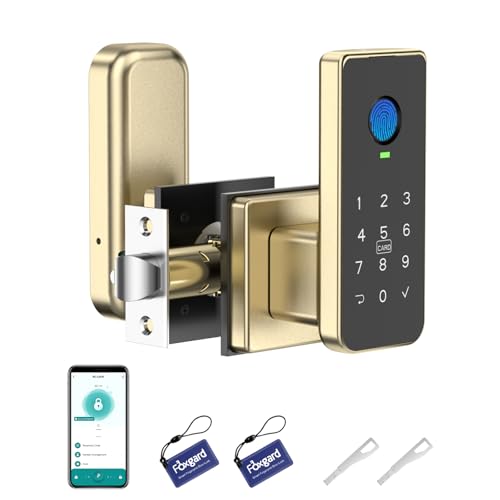
Best Indoor Privacy Lock – 5-in-1 Biometric Smart Lock
For battery powered smart locks intended for indoor spaces, this 5-in-1 biometric model combines fingerprint, keypad, app, IC-card, and mechanical-key access. Its privacy-focused features, temporary passcodes, and electronic anti-lock make it especially suited to bedrooms, offices, rentals, and Airbnb rooms.
Best For: Indoor bedroom or office doors where privacy controls, temporary codes, and access logs are useful.
Pros:
- Provides five unlocking methods, including fingerprint, keypad, app, IC card, and mechanical key.
- Supports one-time, timed, and dynamic passcodes with app-based access logs.
- Includes auto-lock, anti-peep keypad entry, electronic anti-lock, and a backlit keypad.
- Installs with a screwdriver and uses four AA alkaline batteries with low-battery alerts.
Cons:
- Four AA batteries are not included.
- Remote and voice control require the separately sold Foxgard Gateway.
- Its stated applications focus on indoor use rather than exterior front-door installation.
This lock is best viewed as an indoor access-management solution rather than a fully connected exterior lock. The temporary-code tools and privacy lock are useful for shared homes, offices, rentals, and guest rooms.
How We Picked the Best Battery Powered Smart Locks
We selected models that cover the main ways shoppers use smart locks: keypad entry for family and guests, biometric access for fast personal entry, app-based control for remote management, and mechanical keys for backup access. We also considered installation style, compatibility with common residential doors, connectivity options, battery configuration, and useful features such as auto-lock and temporary access codes.
Because battery life varies with usage, temperature, wireless activity, and battery quality, it should be treated as an estimate rather than a guarantee. A low-battery alert and an accessible emergency power option are especially valuable.
Quick Comparison
- Best for palm recognition: Wyze Palm Lock and Veno Go offer hands-free biometric entry.
- Best for fingerprint access: Tapo, eufy, Wyze, and several combination models support fast fingerprint unlocking.
- Best for straightforward keypad entry: TEEHO TE001 and the Tapo DL100 focus on tactile code-based access.
- Best for remote control: Wi-Fi-enabled models can support app alerts, remote locking, and user management, though features may depend on the required hub or network setup.
- Best for door-knob replacement: The Yamiry model is designed for doors using a knob-style lock rather than a standard deadbolt.
Key Buying Factors for Battery-Powered Smart Locks
Compatibility and Installation
Check door thickness, backset measurement, lock type, and the space around the interior thumb turn before ordering. Deadbolt replacements are not automatically compatible with every door, while smart door knobs require a different installation pattern.
Entry Methods and Access Control
Keypads are convenient for households, rentals, and service providers because codes can be shared without physical keys. Fingerprint and palm recognition are fast for regular users, but performance can vary with wet, dirty, or damaged fingers. Look for guest-code management and a dependable key override if several people need access.
Connectivity and Smart Features
Bluetooth models usually work nearby, while Wi-Fi models may allow remote locking, notifications, and access management away from home. Confirm whether Wi-Fi requires a separate bridge and whether the app supports the phone platform and integrations you use.
Power and Security
Review the stated battery type and expected runtime, then plan a replacement schedule. Dual-battery designs can provide useful redundancy. Choose a lock with low-battery warnings, auto-lock settings you can adjust, and an emergency power method that remains usable when the batteries are depleted.
Who Should Buy Which Battery Powered Smart Locks?
Choose a keypad-first model if you want simple access for children, guests, or contractors. Pick fingerprint recognition if convenience for daily household members matters most. Palm recognition may suit users who prefer not to touch a keypad or sensor. Wi-Fi connectivity is worthwhile for remote access and alerts, while a simpler Bluetooth or offline lock can be the better value when you only need local keyless entry. If installation flexibility or backup access is your priority, favor a model with a conventional keyway and clear compatibility specifications.