A smart lock with handle combines convenient keyless access with the complete door hardware many homes need in one upgrade. The right model can let you unlock by fingerprint, keypad, app, or traditional key while adding useful features such as auto-locking and remote access.
Below, we compare 10 options for front doors, family entryways, Airbnb properties, and rentals. Focus on compatibility, power, connectivity, and access management before choosing the best fit for your door and daily routine.
Best 10 Smart Lock with Handle Picks for 2026
Best Fingerprint Access
Philips Wi-Fi Smart Lock with Handle

- Fingerprint reader is built into the handle
- Five unlocking methods, including app and voice control
- Supports up to 100 passcodes and entry logs
Best For: Busy households and flexible guest access
Best Simple Keypad Upgrade
Kwikset SmartCode 917 with Halifax Handle

- Supports up to 30 customizable user codes
- Three entry modes include Auto Lock and Passage
- Reversible lever and re-keyable SmartKey cylinder
Best For: Keypad access without app or Wi-Fi dependence
Best Built-In Wi-Fi Security
Schlage Encode Smart WiFi Lever

- Built-in Wi-Fi supports remote app control
- Customizable alarm helps detect forced entry
- Works with Alexa, Google Assistant, Ring, and Airbnb
Best For: Connected homes needing remote monitoring
Best Complete Front-Door Set
Philips Wi-Fi Lock with Handles

- Includes a coordinated lock and handle set
- Remote app control with status and access history
- Supports five entry methods and up to 100 user codes
Best For: Front-door replacements with guest access needs
Best Interior-Door Pick
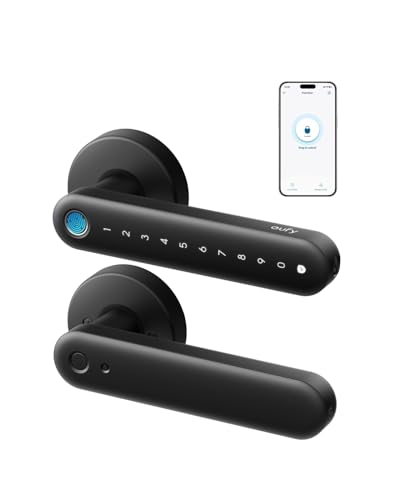
- 0.3-second fingerprint unlocking
- Built-in Wi-Fi for remote management
- Over five months of battery life
Best For: Interior doors needing fast fingerprint access
Best for Rentals
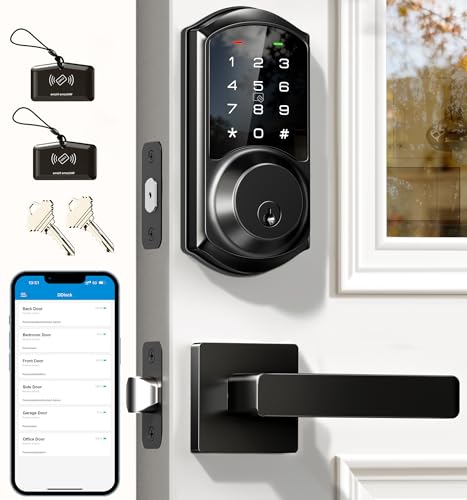
- 250-plus programmable access codes
- App and web-based user management
- Includes two lever handles
Best For: Rental properties and frequent guest access
Best Family-Friendly Option

- Fingerprint, keypad, FOB, and key entry
- Reversible handle for left or right doors
- Optional gateway enables remote access
Best For: Families, Airbnb hosts, and rental properties
Versatile Entry

- Five entry methods, including app, keypad, fobs, and keys
- Manages 250+ codes with scheduled and recurring access
- Gateway required for remote and voice-control features
Best For: Flexible access control for homes, rentals, apartments, and offices
Biometric Convenience

- Fingerprint reader is integrated into the handle grip
- Built-in Wi-Fi enables remote app access and notifications
- Supports passcodes, auto-lock, and anti-peeping passwords
Best For: Families seeking fingerprint entry and hub-free remote control
Connected Upgrade
Philips 4200 Series WiFi Handle Lock

- Built-in 2.4GHz Wi-Fi needs no hub or bridge
- Adds fingerprint, app, PIN, and voice unlocking
- Includes handle set with adjustable auto-lock
Best For: Front-door upgrades requiring remote access, biometrics, and guest codes
Best Fingerprint Access – Philips Wi-Fi Smart Lock with Handle
If you want a smart lock with handle that combines quick entry with broad access control, this Philips model stands out. Its fingerprint reader is built into the handle, so you can unlock and open the door in one motion. It also supports app control, PINs, voice assistants, and a physical key.
Best For: Busy households, offices, and users who want fingerprint access plus flexible guest codes.
Pros:
- Handle-mounted fingerprint reader unlocks in about 0.3 seconds and stores up to 50 fingerprints.
- Offers five entry methods, including app, PIN, voice control, fingerprint, and physical key.
- Supports up to 100 passcodes, including scheduled and temporary codes, with entry logs in the app.
- Includes adjustable auto-lock, passage mode, privacy mode, and anti-peep PIN protection.
Cons:
- Requires eight AA alkaline batteries, which are not included.
- Door compatibility requires specific hole, clearance, backset, and thickness measurements.
This is a feature-rich choice for buyers prioritizing biometric convenience and detailed access management. Measure the door carefully before ordering, especially the 2-1/8-inch hole and clearance requirements.
Best Simple Keypad Upgrade – Kwikset SmartCode 917 with Halifax Handle
For shoppers seeking a straightforward smart lock with handle, the Kwikset SmartCode 917 focuses on keypad entry and dependable mechanical features. It supports up to 30 user codes, offers multiple locking modes, and includes a reversible Halifax lever for left- or right-hand doors.
Best For: Homeowners who want keyless entry without app or Wi-Fi requirements.
Pros:
- Stores up to 30 customizable access codes, including optional one-time codes.
- Auto Lock, Passage, and Disable Passage modes accommodate different routines and property-management needs.
- SmartKey Security allows the included key cylinder to be re-keyed yourself.
- Offers up to three years of battery life and includes a 9V battery.
Cons:
- Control is touch-based rather than app- or Wi-Fi-connected.
- Door backset, cross bore, and thickness must be measured before installation.
The SmartCode 917 is a practical pick when you want a handle and keypad in one package but do not need remote monitoring. Its reversible lever and selectable entry modes add installation and daily-use flexibility.
Best Built-In Wi-Fi Security – Schlage Encode Smart WiFi Lever
The Schlage Encode is a smart lock with handle designed for connected access and remote control. Built-in Wi-Fi lets you manage and monitor the lock through the Schlage Home app, while the touchscreen keypad, customizable alarm, and auto-lock settings add everyday convenience.
Best For: Connected homes that need remote access, app control, and a premium security-focused design.
Pros:
- Built-in Wi-Fi enables locking, unlocking, and monitoring from anywhere through the Schlage Home app.
- Customizable alarm can alert you to door movement and forced-entry attempts.
- Supports auto-lock time delays and a convenient interior control for frequent use.
- Works with Alexa, Google Assistant, Ring, and Airbnb, according to the supplied listing.
Cons:
- The lock is heavier than some alternatives at 4.3 pounds.
- The supplied notes do not specify battery life or included batteries.
This model is a strong fit for buyers who want a recognizable security-oriented lock with built-in Wi-Fi rather than a separate hub. Its app access and alarm features make it especially useful for monitoring an exterior entry point remotely.
Best Complete Front-Door Set – Philips Wi-Fi Lock with Handles
This Philips front-lock set is a convenient option if you want a smart lock with handle and coordinated hardware in one purchase. It includes the lock and handle set, supports remote app management, and provides fingerprint, PIN, key, and voice-control entry methods.
Best For: Front-door upgrades where matching handles, remote control, and temporary access codes matter.
Pros:
- Includes a coordinated handle set for a unified front-door appearance.
- Wi-Fi app control supports remote locking, unlocking, status monitoring, notifications, and access history.
- Offers five unlocking methods, including fingerprints, PINs, keys, app control, and voice commands.
- Supports up to 100 user codes plus temporary, recurring, and one-time PINs.
Cons:
- Compatibility is limited to doors 35–50 mm thick, so measurements are essential.
- Some listing text is incomplete, leaving certain specifications unclear.
Choose this set when replacing both the lock and handles is part of the project. Its combination of Wi-Fi access, flexible codes, and included hardware makes it well suited to households that regularly host guests or service providers.
Best Interior-Door Pick – eufy FamiLock C32
If you need a smart lock with handle for an interior door, the eufy Security FamiLock C32 combines fast fingerprint entry, built-in Wi-Fi, and app-based control in a modern lever design. It is designed for bedrooms, offices, storage areas, and garage entries rather than front-door use.
Best For: Interior doors where quick fingerprint access and remote management are priorities.
Pros:
- Unlocks by fingerprint in about 0.3 seconds and supports 360-degree recognition.
- Built-in 2.4 GHz Wi-Fi enables remote authorization and lock management.
- Four AA batteries last over five months, with USB-C power-bank backup.
- Installs in about 15 minutes with a screwdriver and works with Alexa and Google Assistant.
Cons:
- Not recommended for front doors.
- Does not support rekeying.
The C32 is a practical choice for households that want fingerprint convenience without adding a separate Wi-Fi hub. Its interior-door limitation is the main consideration, but auto-lock, voice control, and emergency USB-C power add useful everyday flexibility.
Best for Rentals – Veise VE06-L
The Veise VE06-L is a smart lock with handle aimed at homes, rentals, and properties with frequent guest turnover. It offers app, code, IC card, key, and e-key access, while its optional G2 gateway adds remote control and voice-assistant compatibility.
Best For: Landlords, property managers, and homeowners managing multiple users or temporary guests.
Pros:
- Supports app access, 250-plus codes, IC cards, keys, e-keys, and Apple Watch use.
- Web portal and app provide user permissions, access logs, and remotely generated passcodes.
- Offers scheduled, recurring, one-time, and anti-peeping codes.
- Fits many standard doors, installs with a screwdriver, and includes two handles.
Cons:
- Remote access and Alexa or Google Assistant control require the separately sold G2 gateway.
- Rated IP54 and BHMA/ANSI Grade 3, which may not suit every exposed entry location.
With flexible credentials and detailed access management, the VE06-L is especially well suited to rental and guest-access workflows. Buyers should factor in the gateway cost if they need control while away from the property.
Best Family-Friendly Option – Sifely Fingerprint Lock
This fingerprint smart lock with handle combines biometric entry, a back-lit keypad, app control, FOB access, and physical keys. As a smart lock with handle, it can simplify entry for families, children, older users, and rental guests while supporting optional remote access through a Sifely Wi-Fi Gateway.
Best For: Families and Airbnb or rental hosts who want several ways to unlock the door.
Pros:
- Supports fingerprint, keypad, app, FOB, key, and key-card entry.
- App and web tools can generate guest codes and provide access records.
- Reversible handle fits left- and right-handed doors with DIY installation.
- Works with Alexa and Google Assistant when paired with the optional Wi-Fi Gateway.
Cons:
- Remote access and voice control require the separately sold Sifely Wi-Fi Gateway.
- The supplied notes specify a one-year product warranty.
The Sifely model stands out for offering multiple entry methods in one family- and rental-oriented package. Its optional gateway expands remote features, but buyers wanting out-of-the-box Wi-Fi control should account for that additional accessory.
Versatile Entry – Veise VE06-H Smart Handle Set
The Veise VE06-H is a practical smart lock with handle for front doors, rentals, apartments, and offices. It combines app control, keypad entry, fobs, mechanical keys, and thumb-turn access, while its optional G2 gateway adds remote monitoring and smart-home compatibility.
Best For: Households and rental properties that want multiple access methods and flexible user-code management.
Pros:
- Offers five entry methods: app, code, fobs, mechanical keys, and thumb turn.
- Supports permanent, one-time, scheduled, and recurring codes, with capacity for 250+ user codes.
- Includes auto-lock, one-touch locking, privacy mode, passage mode, and low-battery alerts.
- Includes a handle set, two fobs, and two backup keys.
Cons:
- Remote control and Alexa or Google compatibility require the separately sold Veise G2 gateway.
- Installation requires three appropriately spaced pre-drilled door holes.
- Door thickness, backset, cutout, and hole spacing must be verified before purchase.
The VE06-H stands out for access flexibility and detailed code management. It is a good fit when you want a complete handle set and several backup entry options, provided your existing door matches the installation requirements.
Biometric Convenience – eufy Security C33 Smart Lock
The eufy Security Smart Lock C33 is a smart lock with handle designed for convenient keyless entry. Its fingerprint reader is built into the handle grip, while built-in Wi-Fi enables app-based access management, notifications, and event-history review without an additional hub.
Best For: Families and users who prioritize fingerprint access, built-in Wi-Fi, and straightforward installation.
Pros:
- Integrated fingerprint recognition provides quick biometric entry for family members.
- Built-in Wi-Fi supports remote app control, real-time notifications, and event history.
- Offers passcode access, a backlit keypad, anti-peeping passwords, and auto-lock.
- Designed for left- or right-hand doors and installs without drilling in about 15 minutes.
Cons:
- Power comes from eight AA batteries, which are not specified as included in the supplied notes.
- The supplied information does not mention mechanical-key backup access.
- Compatibility is broad, but the specific door and lock-preparation requirements should still be checked.
The C33 is a strong choice for households that want fast fingerprint entry and remote connectivity in one unit. Its no-drill installation claim may simplify replacement, but checking your door setup remains sensible before ordering.
Connected Upgrade – Philips 4200 Series WiFi Handle Lock
The Philips 4200 Series is a smart lock with handle that connects directly to 2.4GHz Wi-Fi, so no separate hub is required. It combines app control, fingerprint access, voice commands, flexible PIN codes, and an included handle set for a complete front-door upgrade.
Best For: Homeowners and rental hosts who want built-in Wi-Fi, biometric access, voice control, and remote code management.
Pros:
- Built-in 2.4GHz Wi-Fi enables remote control, status checks, access history, and notifications.
- Fingerprint unlocking is rated at 0.3 seconds and supports multiple stored fingerprints.
- Supports permanent, one-time, periodic, and recurring PIN codes.
- Includes a matching handle set and adjustable auto-lock timing from 0 to 180 seconds.
Cons:
- Requires eight AA alkaline batteries, which are not included.
- It is designed for doors 1-3/8 to 1-3/4 inches thick, so compatibility must be confirmed.
- It connects to 2.4GHz Wi-Fi rather than the 5GHz band specified in the notes.
The Philips model offers one of the more complete feature sets in this group, especially for remote access and guest management. Its included handle and hub-free Wi-Fi simplify a smart-lock upgrade, while the door-thickness and battery requirements deserve attention.
How We Picked the Best Smart Lock with Handle
We selected models across several common use cases and price ranges, prioritizing practical access methods, installation scope, connectivity, security features, and handle design. The lineup includes fingerprint and keypad locks, Wi-Fi-enabled options for remote control, complete handle sets, and models suited to rentals or shared households.
We also considered whether each lock appears designed as a replacement for a deadbolt, lever, or front-door lock set. Always verify the manufacturer’s measurements and door requirements before ordering, since compatibility can depend on backset, door thickness, borehole size, handing, and the existing latch configuration.
Quick Comparison
| Best For | Features to Prioritize | Models to Consider |
|---|---|---|
| Everyday family entry | Fingerprint access, PIN codes, auto-lock | Philips, eufy FamiLock C32, eufy C33 |
| Remote access | Built-in Wi-Fi or reliable app connectivity | Schlage Encode, Philips Wi-Fi models, eufy C33 |
| Complete front-door replacement | Matching handles, deadbolt, and latch hardware | Philips Front Lock Set, Veise VE06 models |
| Rental or guest access | Temporary codes, remote management, activity control | Fingerprint keypad models, eufy, Philips |
| Traditional appearance | Lever styling and key backup | Kwikset SmartCode 917, Schlage Encode |
Key Buying Factors for a Smart Lock with Handle
Door Compatibility and Installation
Check the door thickness, backset, borehole spacing, latch type, and whether the lock replaces only a deadbolt or the entire handle assembly. A complete set may simplify a coordinated upgrade, but it can require more careful installation than a single smart deadbolt.
Unlocking Methods
Keypads are useful for families and guests because codes can be shared without physical keys. Fingerprint readers offer fast personal access, while app control is helpful when you need to unlock the door remotely. A physical key or exterior backup method is valuable if batteries fail or electronics malfunction.
Connectivity and Remote Control
Bluetooth may work well for nearby control, but remote unlocking generally requires Wi-Fi, a hub, or a compatible bridge. Built-in Wi-Fi is convenient, though it can use more battery power. Confirm whether remote features require an app account, subscription, or separate accessory.
Power, Security, and Access Management
Look for clear low-battery alerts, emergency power options, automatic locking controls, and durable exterior materials. For households, temporary PINs and individual user codes are more useful than one shared code. Review the privacy and permissions settings in the companion app before enabling remote access.
Who Should Buy Which Smart Lock with Handle?
Choose a fingerprint-focused model if fast, key-free entry is the priority for household members. Pick a Wi-Fi-enabled lock if you regularly manage access while away, receive deliveries, or operate a rental. A complete front-door lock set makes sense when replacing both the deadbolt and handle, while a lever-style smart lock is a better fit when you want a familiar interior and exterior profile.
For a first smart-lock upgrade, prioritize straightforward installation, dependable backup entry, and a handle that matches your existing door hardware. If several people need access, favor models with multiple user codes or fingerprints and clear activity controls. Whichever option you choose, test the lock manually after installation and keep fresh batteries available.